I built micasa because my home maintenance system was three binders held
together with duct tape and prayer.
You know how it goes.
- The dishwasher starts making a sound that’s either nothing or a $400 problem, and you think is that still under warranty? The warranty card is in a drawer. Which drawer? The one with the batteries, the takeout menus, a mystery Allen wrench, and thirty other things that prevent it from closing.
- You’re daydreaming about the deck, so you get three quotes and write them on the back of an envelope that your partner throws away because it looked like junk mail.
- Something is leaking somewhere and you vaguely remember that you were supposed to call someone about it at some point.
The breaking point for me was Google Tasks and Thanksgiving. I was tracking
aspirational house projects then somehow ended up with three separate lists
called Electrician with the ingredients for Friendsgiving recipes on one of
them.
The common thread was disorganized friction. Every tool I tried added a step between “I should write this down” and actually writing it down. Open the browser, find the tab, wait for it to load, remember which spreadsheet, find the right row – by then the moment has passed and the information goes back to living in my head, where it will be wrong about the roof.
… and I still can’t see how anything is related.
VLOOKUP, you might say? No thanks, I’ll build a terminal UI using AI. In
Go, a language in which I am apparently only qualified to write Hashicorp Nomad
plugins. Go figure.
The terminal was already open#
I hate the mouse. Every time my hands leave home row I can feel my brain turning into absolute mush, and getting back is like trying to pick up a mound of peanut butter on a jamón factory floor – “frictionless”, yet impossible. I spend most of my day in a terminal, and I need things to be keyboard-driven or I just won’t use them.
micasa is a keyboard-driven terminal UI that tracks maintenance schedules,
projects, incidents, vendor quotes, appliances, warranties, service history,
and file attachments.
The interface is modal, vim-style. If you don’t like vim, then you probably won’t like micasa. Emacs keybindings are not on the near-term feature list.
Anyway, like in vim, you navigate in one mode, edit in another. Sort by any column, pin values to filter, hide columns you don’t care about, drill into related records. It’s dense because houses are dense, and your terminal isn’t getting any wider.
One file, that’s it#
Everything lives in a single SQLite database. Your maintenance history, your vendor contacts, your warranty dates, the PDF of that invoice you’ll need in three years when something breaks again – all of it. One file.
micasa backup backup.db # that's your entire backup strategy
Since everything nowadays seems to want you to log in including your damn smoke detector, with “security” questions like “What were you eating on the first Tuesday of your last month of high school?”, I decided that it was time to get back to basics and build micasa without a bunch of annoying crap.
Here’s what I wanted: no cloud sync. No account. No subscription. No API that gets deprecated while I’m not looking. The database is a regular file on my filesystem that I can copy, move, or put in Dropbox. Or not.
This is deliberate. Home data is personal, low-volume, and long-lived. You’ll want to know when the roof was last inspected in 2032. The tool that stores that answer needs to still be around in 2032, and “a file on your computer” has a better survival rate than most startups.
Plus, when people ask you “Why do you know the BTUs of your water heater off-hand?”, you can answer them in what you pretend is cryptic Spanish: “micasa.”
What it actually tracks#
Say the dishwasher starts making a noise. You open the appliance record and there’s the model number, the serial number, the warranty expiration date you definitely would not have remembered. There’s also the maintenance schedule you set up – “clean the dishwasher filter every 3 months” – and the log showing the last time you actually did it. Yes, your dishwasher has a filter. Yes, you were supposed to be cleaning it.
It turns out the noise is bad enough to call someone. You pull up your vendors and find the repair company that serviced the washing machine last year – their contact info, the quote they gave you, what they charged. You get a new quote for the dishwasher and it links back to the same vendor, so next time you don’t have to ask your neighbor “who was that guy you used?”
Maybe the dishwasher is dying and this becomes a kitchen project – new dishwasher, maybe redo the countertops while you’re at it. The project tracks the budget, the status, and links to all the quotes you’re collecting. The contractor’s invoice gets attached as a document, stored right in the database alongside the appliance manual and the warranty PDF.
Or maybe it’s not the dishwasher at all. You pull off a piece of trim and discover ants – not a recurring maintenance task, not a multi-month project, just an urgent thing that needs handling now. That’s an incident. You log the severity, the date you noticed it, and optionally link it to the appliance or vendor involved. When the exterminator resolves it, you mark it done and the record stays for next time something crawls out of the woodwork.
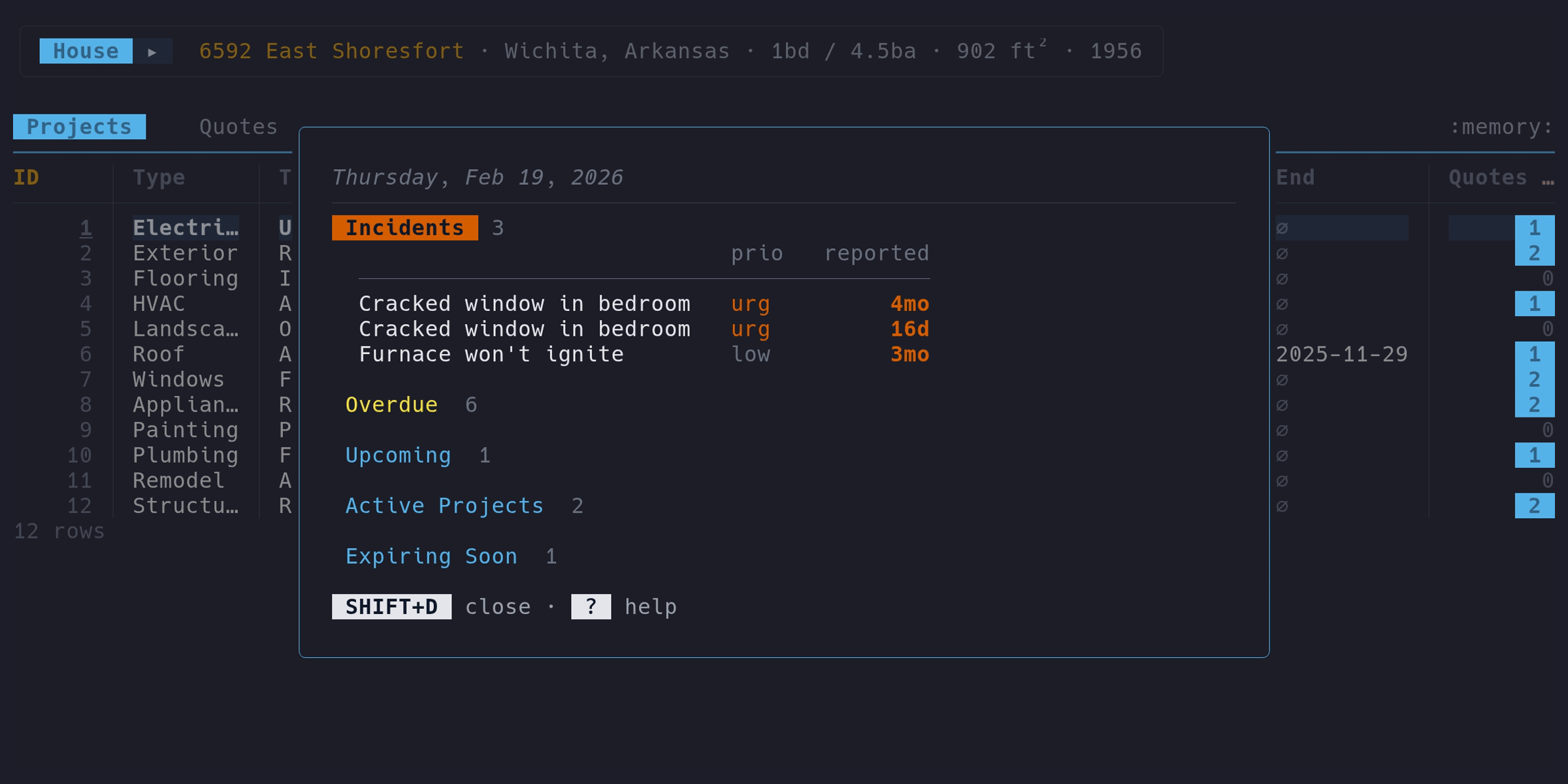
Those are two threads through the data, starting from a weird noise and an unwelcome discovery. Everything links together, and those links feed the dashboard that gives you the big picture on startup: open incidents, overdue maintenance, active projects, and expiring warranties. If nothing needs attention, it’s empty. Silence means your house is behaving itself.
Needless to say, the demo house is not behaving itself.
There’s also an optional LLM chat feature that can answer questions about your data, powered by a local model via Ollama or any OpenAI-compatible API. It’s fun to poke at, but it’s not load-bearing – every feature works fully without it. It’s also the only part that phones home, and only to servers you configure.
Try it#
go install github.com/micasa-dev/micasa/cmd/micasa@latest
micasa demo   # sample data to poke around with
micasa          # start fresh with your own house
Linux, macOS, and Windows. Binaries on the releases page if you don’t have Go installed.